
Mobile Banking Enhancements Exciting Updates in Mobile Banking!
Robins Financial is dedicated to investing in our members and actively responding to feedback by enhancing our Digital Banking services. In our next release, when you log in to Digital Banking via a mobile device, you will see that the Homepage Links & Menu bar has been moved from the top of the home screen to the bottom of the screen. This thumb bar menu will display on each page1 you click on, making it easier to navigate between different screens.
New Thumb Bar Menu1
The Thumb Bar Menu provides easy access to the most frequently used features in digital banking, conveniently located at the bottom of your mobile screen. Available exclusively on phones2, it offers quick navigation across nearly every page in mobile banking1—unlike the Homepage Links menu, which only appears after logging in.
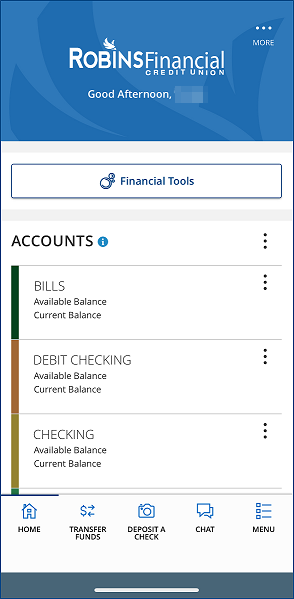
1Thumb Bar Menu won't appear on pages with windows or panels, such as Mobile Bill Pay, Check Reorders, or Documents. Thumb Bar Menu is not available on tablets.
2Mobile device must be on at least version 5.5.08 (iOS) or 5.5.07 (Android).
Warning: You Are Leaving This Site.
You are about to follow a link to [Link].
Please be advised that Robins Financial is not responsible for the content of the site for which you are about to view, nor can Robins Financial guarantee that the site will be available. The privacy and security policies of the site you are visiting may differ from those established and published by Robins Financial.
To proceed, click 'continue' below. To remain on this site, click 'cancel' below.